Hardware security keys are the only real barrier between attackers and your accounts. Millions of people wake up to locked accounts and frozen credit lines every year. Financial institutions hand users software authentication that cannot verify actual account ownership. That fundamental flaw makes accounts vulnerable regardless of password strength or complexity. Attackers do not need your password when the verification method itself can be defeated remotely.
Authentication software creates the illusion of protection while leaving critical gaps permanently open. A phishing page captures the six-digit code sent to your phone instantly. Attackers replay that code against the legitimate platform before the validity window expires. Hardware security keys introduce a physical requirement that no remote attacker can satisfy. Every day that gap remains open is another day your accounts are fully exposed. The protection you believe you have is not the protection you actually possess.
Why Software Authentication Fails at the Moment It Matters Most
Credential verification runs on the same processor as your browser and email client. Every background application shares that processor without asking your permission first. A malicious script running silently can access memory where the system temporarily stores credentials. This theft requires no physical access to your machine at any point. Attacks like these leave no visible trace and trigger no alerts anywhere in the process. The account owner never knows the theft happened until the damage is already done.
Phishing attacks exploit the timing gap that software authentication creates during verification. A convincing fake login page captures your credentials and one-time code simultaneously. That information reaches the attacker’s server before the validity window closes. Users without hardware security keys have no protection against this attack method. The attacker confirms a successful login because they completed it on the legitimate platform. Nothing in the process alerts the real account owner that someone else is now in control.
How One Compromised Account Becomes Many
Attackers who gain access to one account immediately target every connected platform. Password reset requests flow through the compromised email address without interruption. Every platform linked to that address becomes accessible within a matter of hours. By the time you attempt to log in again your password has already been changed. Attackers redirect your recovery email to an address you do not control. A single compromised account quickly cascades into a fully compromised digital identity.
Credit disputes, platform recovery, and financial investigations all demand significant time and effort. Victims spend an average of two hundred hours resolving a single identity theft incident. Employers, landlords, and lenders all see the damage long before recovery finishes. Hardware security keys break this chain before the first account is ever compromised. No recovery process is necessary when the initial attack cannot succeed in the first place. Prevention through physical authentication eliminates the cascading consequences entirely.
How Physical Authentication Closes the Gap Software Cannot
The Challenge-Response Architecture
The YubiKey 5C NFC operates on a entirely different authentication architecture entirely. No remote attacker can replicate or intercept its physical requirement. Every login attempt sends a cryptographic challenge that the key must physically answer. Calculations happen in complete isolation from the host machine’s processor and memory. No background script can reach that tamper-resistant environment regardless of how deeply embedded it is. The isolation is architectural, not procedural, which means software cannot override it under any condition.
Credentials remain in the chip during the authentication process at any point. The private key never touches the host system’s memory under any circumstances. The key’s dedicated chip handles every calculation that authorizes a login. Authentication requires a human being to be physically present with specific hardware. An attacker capturing credentials through a phishing page gains nothing useful from them. The physical key must complete every authentication sequence without exception. Remote attackers are structurally excluded from the verification process regardless of their sophistication.
Physical presence transforms authentication from a digital transaction into a verified human action. No automated system can replicate the tap that completes the cryptographic handshake. Credential replay attacks fail because no remote system can generate the required response. The chip inside the key performs calculations that no software can simulate or intercept. Every login protected by hardware security keys requires an attacker to physically possess the device. That requirement alone eliminates the entire category of remote credential theft attacks permanently.
Phishing Resistance at the Protocol Level
The FIDO2 authentication standard inside the YubiKey introduces a critical domain-binding mechanism into every login. The FIDO2 standard mathematically binds every cryptographic response to the legitimate website’s specific domain. A phishing page on a different domain receives a mathematically rejected response every time. Hardware security keys make this protection completely automatic and entirely invisible to the user. This protection functions correctly without any security judgment from the user. The math that protects the account operates on its own of human awareness or attention.
Registered hardware keys cannot be fooled by even the most convincing phishing pages. The phishing page captures the tap but the legitimate platform rejects its response entirely. Domain binding identifies the fraudulent origin of every request with complete certainty. Attackers receive a security response that is useless outside the fraudulent domain they control. Hardware security keys outperform authenticator apps, SMS codes, and email verification links on this basis. Human judgment fails under social engineering pressure, but hardware domain binding never does. The protocol itself embeds this protection rather than depending on user behavior.
Well-resourced attackers invest heavily in making phishing pages appear completely legitimate. Visual design, SSL certificates, and familiar layouts all contribute to convincing presentations. Users under time pressure or emotional stress make authentication mistakes regularly. Hardware security keys remove human judgment from the equation entirely at the protocol level. Even a user who cannot identify a phishing page remains protected by domain binding. The key refuses to complete authentication on fraudulent domains regardless of what the user believes. That absolute protection is what separates hardware authentication from every software alternative available.
The Investment Required and the Risk It Removes
The YubiKey 5C NFC represents a deliberate and measurable security investment for any user. Its price must be measured against the documented cost of a single identity theft incident. Identity theft recovery consumes an average of two hundred hours of the victim’s time — one reason broader data protection habits matter alongside hardware authentication. That time cost dwarfs the price of two hardware security keys by a significant margin. Direct financial losses occurring between the theft and recovery make the comparison even more decisive. Professional reputation damage and missed opportunities compound the financial harm further over time.
The Google Titan Security Key offers a strong alternative for buyers evaluating multiple hardware options. Comparing both against your existing platforms clarifies which hardware fits your infrastructure without additional overhead. Neither requires subscription renewal nor degrades in effectiveness over time with regular use. Hardware security keys do not introduce new attack surfaces through ongoing software update cycles. Authenticator apps require continuous updates to remain effective against evolving threat methods. Physical authentication requires no updates because the protection is built into the hardware itself.
Building a Resilient Two-Key Security Architecture
When deploying two hardware keys across every high-value account represents a one-time decision. No subscription renewal is required and effectiveness never degrades over time. The second key stays home while the primary key travels with you daily. Losing one unit does not interrupt access to any protected platform during replacement. Register both keys simultaneously to ensure continuous access throughout the deployment. The complete scope of digital identity exposure across physical and digital threat surfaces is documented in the full security guide and the AI data harvesting guide.
Two hardware security keys represent a one-time decision that protects your accounts indefinitely. Financial accounts, email providers, and password managers all support hardware key authentication today. Every platform added to the hardware authentication system reduces the overall attack surface permanently. The protection compounds across accounts rather than degrading as the threat landscape evolves. Attackers will continue developing more sophisticated phishing infrastructure and social engineering campaigns. Hardware security keys will continue defeating those campaigns at the protocol level regardless. Physical authentication delivers a permanent architectural advantage over remote attackers rather than a temporary solution.
Security Hardware
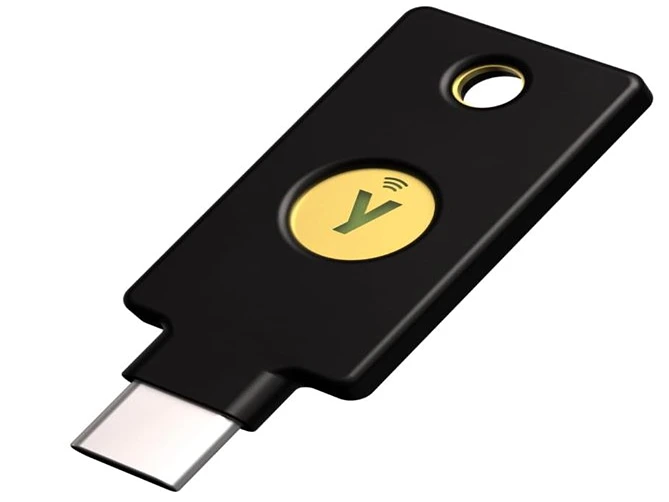
YubiKey 5C NFC
Certified (MFA) Security Key and Passkey