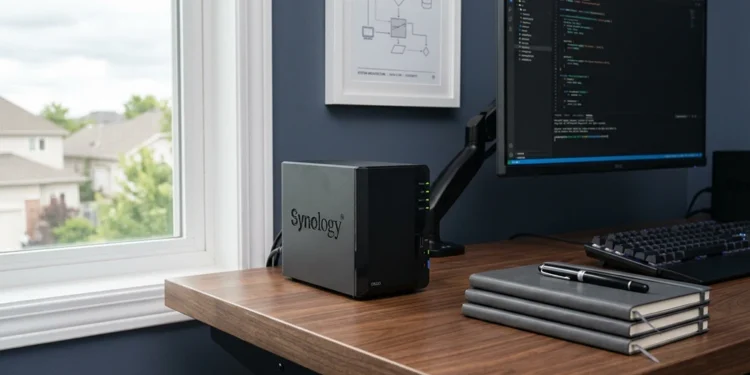
The Case for Sovereign Data Archiving
Real control over your own data starts with stepping away from total reliance on someone else’s remote servers. When you store your personal files only on commercial cloud platforms, you’re not really owning that space. You’re leasing it. And that lease comes with a Terms of Service agreement that can change whenever the company decides it should. That’s exactly why more households and small businesses are turning to independent data storage. It’s a way to protect what’s yours from sudden policy shifts and pricing changes you never agreed to. These platforms reserve the right to scan your files for compliance purposes. They can raise prices or suspend your account outright. And when that happens, you usually have little to no legal recourse.
Taking real control of your digital footprint means letting go of the passive consumer mindset most of us default to. You become the architect of your own storage setup instead of just a tenant in someone else’s system. This keeps everything that matters to you, from old family photos to years of business records, accessible on your terms. Your access stops depending on a corporation’s uptime, their business decisions, or their next policy update.
We’ve been trained to assume that anything stored “in the cloud” is automatically safe. That assumption doesn’t hold up as well as people think. Physical possession is still the clearest form of ownership there is. So when you move your most important records onto hardware you actually own, you cut out the middleman completely. What you’re left with is a direct line of control over your own information, with no one else holding the keys.
Why the Cloud Compromises Data Ownership
The convenience of cloud storage can mask its long term operational risks. Centralized data centers are frequent targets for malicious actors, which leaves private records exposed to credential leaks and server side exploits. Meanwhile, many consumer providers also use automated models to analyze file contents for behavior tracking or platform optimization. Understanding these hidden risks matters if you want to keep records secure, and reviewing our data privacy best practices guide is a useful next step before moving forward with any storage decision.
Beyond privacy concerns, the economics of commercial subscriptions trap users in ongoing financial obligation. Fees scale as your data footprint grows, which creates an expensive lock in over time. Once terabytes of information sit inside one provider’s workflow, moving those assets elsewhere becomes slow and costly. However, choosing dedicated physical hardware breaks this cycle entirely. A one time investment in storage media builds a permanent asset under your own control, free from monthly caps, and this is one of the clearest advantages of independent data storage solutions over a recurring subscription model.
Auditing Your Local Backup Infrastructure
Before buying retail hardware, take a precise inventory of your existing digital footprint. Modern digital lives are often scattered across phones, tablets, old laptops, and various free cloud tiers. Cataloging these assets by file type, size, and importance is the first step. It leads to designing a Local Backup Infrastructure that matches your actual daily needs. Once this inventory is complete, evaluate how often you need to access each category. This helps you avoid overspending on components that do not match your workflow.
Cold storage arrays suit archival needs. Documents, older media files, and legacy backups do not require instant read or write speed. High capacity mechanical drives offer the lowest cost per gigabyte for these files. Hot storage tiers, on the other hand, suit active work instead. Daily files, running databases, virtual machines, and raw media editing all demand solid state drives with fast transfer protocols.
Additionally, once your audit is complete, plan for future growth since digital footprints rarely shrink. Our storage growth strategies breakdown can help you calculate a realistic capacity buffer before you commit to hardware. This way your setup remains useful for years rather than months.
Choosing Personalized Data Vaults That Last
Long term data preservation depends on hardware built for continuous workload cycles. Standard consumer external drives often use Shingled Magnetic Recording, known as SMR. These drives are cheap to manufacture, but they slow down during large sustained writes and wear out faster under constant use. When building Personalized Data Vaults, prioritize enterprise grade or NAS specific internal drives instead, since these are engineered for the demands of continuous operation.
Drives using Conventional Magnetic Recording, or CMR, handle the thermal load and vibration of multi drive arrays far better than their SMR counterparts. In addition, the external housing also matters for durability. Avoid cheap plastic enclosures that trap heat, and instead choose aluminum cases with active cooling fans or strong passive heat sinks. Lower operating temperatures directly extend the lifespan of the drive’s motor and internal components, which ultimately protects the value of your investment.
The Logic of Self-Managed Storage Systems
A stack of unorganized external drives on a desk is not a real security plan. It is simply a pile of fragile components. Building resilient Self-Managed Storage Systems relies on the industry standard 3-2-1 backup rule. This method keeps your data recoverable even through hardware failure or a physical site disaster, and it forms the backbone of most independent data storage solutions used by experienced IT professionals.
The rule calls for three copies of your data across two types of media, with one copy stored offsite. In a self hosted setup, the offsite copy might live on a secondary drive array kept at an office or a relative’s home, rotated on a strict schedule. As a result, this redundancy removes your dependence on any single point of failure. For a different take on organizing local files, our file management systems comparison looks at several localized approaches worth considering.
Assembling Your Private Backup Hardware Hub
Building a Private Backup Hardware hub requires attention to electrical stability. Sudden voltage drops or blackouts can damage drive controllers mid write and cause file corruption. Therefore, connect your critical storage hardware to a UPS with battery backup so the system has time to safely unmount file systems and clear the disk cache before power fully drops.
Connection interfaces are often the weakest link in a home storage setup. Avoid old USB 2.0 cables or unpowered hubs that split voltage across ports. Instead, use direct USB 3.2 Gen 2 or Thunderbolt connections for faster transfer rates. Finally, configure your storage software to monitor hardware health. File systems like ZFS or Btrfs run automated scrubbing to catch bit rot, the slow silent decay that affects magnetic media over time, before it becomes a larger problem.
Lifecycle Maintenance and Verification
Proactive maintenance defines a resilient storage setup. Avoid a set it and forget it mindset, since that often means discovering a corrupt backup exactly when you need it most. Instead, run a quarterly restoration drill. Pull a random sample of archives or database backups, restore them to a test directory, and check their integrity against the originals.
Additionally, automate S.M.A.R.T. diagnostics to run weekly across all connected disks. Tracking reallocated sector counts or spin up times helps you catch a failing drive weeks before it fails completely. Plan for a predictable retirement cycle too, replacing operational drives every four to five years to stay ahead of mechanical wear and to keep your entire system reliable.
The Lasting Peace of Mind
Moving to independent data storage solutions is a direct investment in your long term digital freedom. Stepping away from the fees, restrictions, and security gaps of commercial cloud providers gives you an environment you fully own and control.
In the end, the resilience of your system comes down to how consistently you maintain it. Regular auditing and steady verification are what separate a temporary setup from a permanent, professional grade solution, and they are what make independent data storage solutions worth the initial effort.