Sluggish storage rarely announces itself as the problem. It shows up as an editing project that takes too long to open, a game update that interrupts an evening, or a folder transfer that turns into an excuse to step away from the desk. Most people accept that dead time as the cost of using a computer, until a proper storage upgrade makes those pauses disappear.
That is the appeal of the Samsung 990 Pro 2TB. It is not simply about seeing a high score in a benchmark chart; it is about making a system feel ready when the work gets demanding. It is aimed at users who move large files, manage full drives, work with creative applications, or want a gaming PC that does not feel held back by old storage.
A Drive With Headroom
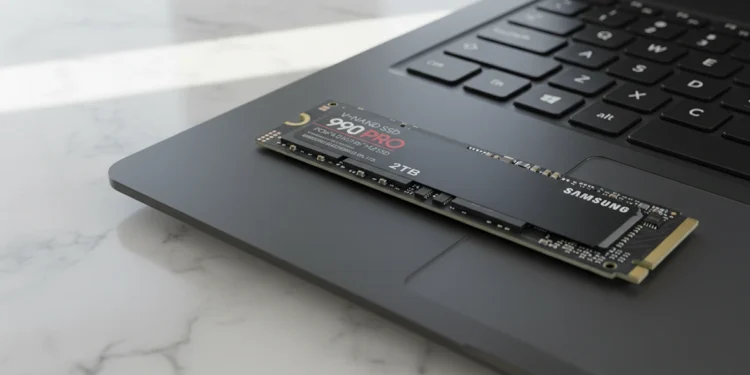
The 990 Pro is a PCIe 4.0 x4 NVMe SSD in the common M.2 2280 format, so it fits many modern desktops and laptops that support a Gen4 M.2 slot. Samsung rates the 2TB model for up to 7,450 MB/s sequential reads and 6,900 MB/s sequential writes, figures that put it near the practical ceiling of PCIe 4.0. Samsung’s 990 Pro lists both ratings for the 2TB model.
Those numbers do not mean every daily task will feel seven times faster. Browsing the web, writing documents, and opening a small spreadsheet are usually limited by other factors. But large media files, photo libraries, virtual machines, game installs, project caches, and operating-system tasks can all benefit when the drive has enough throughput to stay out of the way.
The important difference is headroom. When several jobs need the drive at once, weaker storage can make a computer feel strangely hesitant even when the processor and memory are perfectly capable. A fast 2TB SSD gives the system room to handle an active project, a background backup, and normal app use without turning every file operation into a wait. A broader guide on workstation upgrades can later link here for readers diagnosing their biggest bottleneck.
More Than Peak Speed
The jump from the 980 Pro to the 990 Pro is not just a slightly larger read-speed number. Samsung redesigned the controller around lower power use and says the new architecture delivers up to 50 percent better performance per watt than the previous model. That matters because performance that requires excessive power generally produces more heat, and heat is one of the easiest ways for a fast drive to lose its advantage during sustained work.
For a desktop with abundant airflow, better efficiency helps keep the storage area from becoming another thermal problem beside the graphics card and processor. For a laptop or small-form-factor build, it matters even more. These machines have tighter internal space, fewer cooling options, and less tolerance for hardware that runs hot whenever a video export, backup, or large game installation begins.
Samsung also lists 1,200 TBW of endurance for the 2TB model, alongside a five-year limited warranty that ends when the warranty term or TBW limit is reached. That does not replace a backup plan, but it gives heavy users a concrete measure of the drive’s intended durability. The product’s warranty coverage is particularly relevant for editors, developers, and anyone who writes large amounts of data over time.
Cooling That Matters
Fast storage does not need to feel like specialized hardware, but it does need to manage heat intelligently. Samsung designed the 990 Pro with a nickel-coated controller, a heat-spreader label, and Dynamic Thermal Guard technology. Those choices are meant to help the drive avoid excessive temperature buildup and maintain stable operation under sustained loads rather than concentrating only on short, attention-grabbing benchmark runs.
This is where a lot of SSD comparisons become less useful than they seem. A drive can look impressive during a brief test, but continuous work is different. Copying large video files, exporting a project, installing a 150GB game, rebuilding photo previews, or moving a full backup can create a workload that lasts long enough to expose weak cooling or limited sustained performance.
The 990 Pro will still generate heat when it is working hard; no compact NVMe drive gets a free pass from physics. Desktop users should use a motherboard M.2 heatsink when one is available, especially if the drive sits close to a graphics card. Laptop buyers should confirm clearance before choosing a heatsink model. Those simple checks are part of smart PC building, not unnecessary complication.
A Better Workday
Creative professionals are the clearest audience for this drive because their applications routinely make storage work. Opening large Premiere Pro projects, importing a photo shoot, creating previews, working from sample libraries, loading development environments, or copying an archive all make the drive’s consistency more visible. In those situations, a faster SSD does not feel like a luxury; it feels like removing a small obstacle from every hour of the day.
The 2TB capacity is equally important. A fast 1TB drive can fill sooner than expected once a system contains a full operating system, application suite, large game library, active projects, local backups, and media files. Two terabytes give most people useful breathing room without making them constantly decide what to delete. It is still worth planning storage rather than treating any capacity as infinite, especially with high-bitrate video or RAW photography.
That capacity should never be mistaken for protection. Even a premium SSD can fail, be damaged, be lost, or be affected by accidental deletion. Important files should exist in multiple locations, including at least one separate backup. An internal guide using the anchor backup basics would fit naturally here because a storage upgrade should improve a workflow, not become the only place where irreplaceable work lives.
Userful Software Support
Samsung Magician is one of the less flashy reasons to consider the 990 Pro. It offers firmware updates, health monitoring, performance tools, and drive-management options in one place. Most owners will not need to open it every day, which is a good thing. But when it is time to check health status, update firmware, or confirm that the drive is operating as expected, the software is there.
That kind of support makes the drive easier to own over several years. Storage is usually invisible when everything is going well, but it becomes very important when something looks wrong. Being able to check a drive without digging through scattered utilities or guessing about firmware versions is useful for both experienced builders and people who simply want their PC to remain stable.
The 990 Pro also gives a practical reason to choose a known, established product instead of an ultra-cheap alternative with unclear support. Lower-priced SSDs can still be excellent purchases, particularly for secondary storage or lighter workloads. But a primary drive holding operating-system files, active work, and game libraries is worth choosing carefully. A future SSD buying guide could help readers match drive tiers to how they actually use their systems.
Gaming Is Included
Gaming is a natural fit for the 990 Pro, although buyers should keep the benefit in perspective. The drive can make game installation, updates, transfers, and loading feel quicker, and the 2TB capacity helps reduce the constant uninstall-and-reinstall routine. It will not usually deliver a dramatic frame-rate increase, because most in-game frame-rate limits are determined by the graphics card, processor, and game engine rather than storage speed.
For PlayStation 5 owners, the 990 Pro with heatsink is designed as a compatible storage-expansion option. Samsung describes the heatsink version as optimized for PS5, and the cooler is intended to help the drive operate in the console’s confined M.2 expansion bay. The linked PS5 SSD option shows the product’s intended console use.
A cheaper Gen4 competitor can still make sense for a gaming-only machine if it offers enough capacity, good warranty coverage, and the right cooling at a substantially lower price. The 990 Pro is easier to justify when the computer is also used for large transfers, creative tools, software development, or professional work. That combination makes its speed and endurance more useful than they would be in a strictly casual build.
Who Should Buy It
The Samsung 990 Pro 2TB is not automatically the best option for every PC. Someone using a system for email, basic web browsing, streaming, and light documents may benefit more from any reputable SSD than from this particular premium model. The biggest difference for those users often comes from moving away from an older hard drive or SATA SSD, not from choosing the fastest PCIe 4.0 drive available.
It is a better fit for people who need a primary drive that remains responsive while the workload grows. The combination of high sequential speeds, a 1,200 TBW endurance rating, a five-year limited warranty, capacity for substantial libraries, and a focus on thermal efficiency makes it a strong option for a serious workstation or all-purpose performance PC. The linked 2TB specifications make that value proposition easy to verify.
The competition is not behind simply because it cannot produce a fast Gen4 SSD. The 990 Pro stands out because it balances speed, efficiency, support, cooling considerations, and high-capacity durability in a product that works for more than a one-time benchmark. If your system spends real time moving, editing, creating, compiling, or loading large files, this is an upgrade that can make the entire machine feel more capable.
Samsung Storage
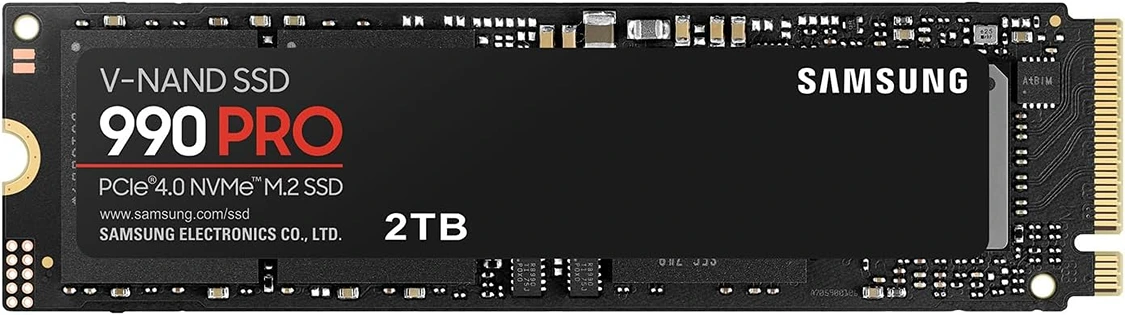
Samsung 990 Pro 2TB
Samsung 990 Pro 2TB NVMe SSD