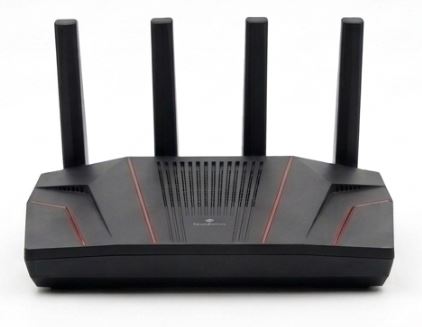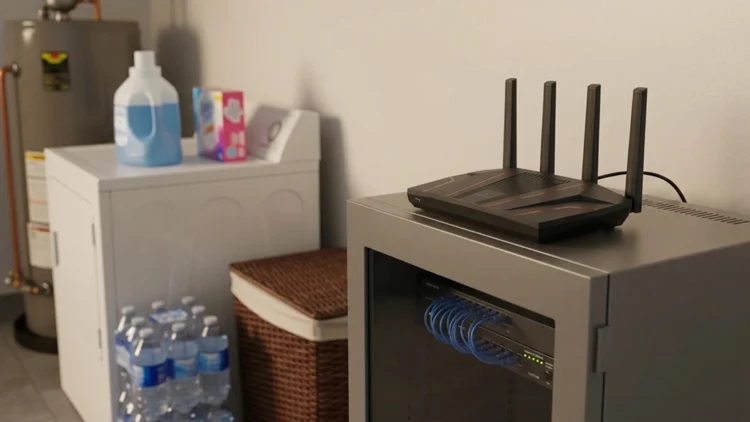
Count the devices in your home that touch the internet. Phones, laptops, tablets, a TV, a game console, a few cameras, maybe a thermostat. Most of them can’t run a VPN app, and the ones that can need a separate login, a separate setting, and a reminder to turn it on. That’s a lot of manual work for a privacy tool that should run quietly in the background. The Fortify VPN router from ExpressVPN and GL.iNet solves that by putting the VPN on the router, so every device goes through it by default.
That sounds simple, and in practice it mostly is. However, the box doesn’t tell you everything. You still pay for an ExpressVPN plan, the headline speed is a ceiling, and several features live in apps instead of the router. This article covers what the hardware does, what independent testing shows, what it costs after year one, and who should buy something else. We checked the specs against ExpressVPN’s own announcement and an independent review of the platform underneath. Then you can decide before spending $200.
What the Fortify VPN router actually is
ExpressVPN retired Aircove and Aircove Go and stopped producing both, according to ExpressVPN’s announcement. Fortify is the replacement, but it isn’t an ExpressVPN-built box anymore. It’s the GL-MT6000, running on GL.iNet’s Flint 2 platform. GL.iNet supplies the hardware, firmware, and router interface, while ExpressVPN supplies the VPN service and privacy technology. Both companies call it the start of a longer partnership, so expect more co-branded routers later. The hardware also moves from Aircove’s AX1800 Wi-Fi rating to AX6000, so this is more than a new logo on the old box.
That split matters for a practical reason. When you buy Fortify, you’re buying a general-purpose GL.iNet router that ships with ExpressVPN support and a year of service. Setup, settings, and firmware come through GL.iNet’s interface, not ExpressVPN’s. If something breaks, that could mean two support teams instead of one. That isn’t a flaw by itself. ExpressVPN describes GL.iNet as a networking specialist with an established following among enthusiasts and privacy-focused buyers. ExpressVPN also says Aircove owners keep support and security updates through 2027, so nobody needs to rush a replacement.
Owners get a nudge to upgrade anyway. ExpressVPN offers existing Aircove and Aircove Go owners 20 percent off Fortify, though you have to contact customer support to confirm ownership and get a code. That discount only matters if the upgrade makes sense for you. If your Aircove still covers your connection speed and you don’t need faster Wi-Fi, keeping it until support ends is a perfectly reasonable choice. Aircove Go owners get even more runway, with support promised through 2028, and ExpressVPN won’t make any more of either model.
Why one router beats a dozen apps
App-by-app VPN coverage can become difficult to manage when every phone and laptop needs its own installation, login, and settings. A service such as NordVPN can protect compatible devices individually, but smart TVs, game consoles, and security cameras often have no VPN option. A router sidesteps that limitation because you configure the connection once and every device inherits it. Every phone and laptop needs its own app, its own login, and its own habit of turning the VPN on. Then you hit the devices that can’t run one at all. Smart TVs, game consoles, and security cameras often have no VPN option. ExpressVPN makes the same point, noting that much of what connects to a home network can’t run a VPN app of its own. A router sidesteps all of that, because you set the connection once and every device inherits it.
The case for a network-level VPN gets stronger when you look at who else sees your traffic. An FTC staff report on six major ISPs found that many of them can access all of a customer’s unencrypted internet traffic. Two of the six said they use web browsing data to target ads, and a third reserved the right to. Retention varied widely, with one provider deleting website logs every 24 hours and another keeping them for a year. The FTC’s ISP report covers 2019 and 2020 data, so treat it as a snapshot, not today’s policy.
A VPN doesn’t erase that exposure, it moves it. Your ISP stops seeing which sites you visit, but the VPN company sees your traffic instead. ExpressVPN points to its no-logs policy and independent audits by PwC, Cure53, and KPMG, as TechRadar reports. Those are company claims backed by outside auditors, not guarantees. Pick the party you trust more, because a VPN shifts trust and never removes it. If you’re ready to stop renting your router, owning the hardware that handles this is a sensible next step. The FTC report also notes past action on insecure ISP-provided routers.
Hardware and Wi-Fi 6 in plain terms
Fortify is a Wi-Fi 6 AX6000 router with a quad-core 2.0 GHz processor, 1 GB of DDR4 memory, and 8 GB of storage. It has two 2.5 gigabit ports and four gigabit ports, plus 4×4 MU-MIMO, up from 2×2 on Aircove. ExpressVPN says it supports up to 86 devices at once. Those numbers matter because VPN encryption is processor work, and a weak chip is what slows most VPN routers down. The 2.5 gigabit ports help if you pay for a multi-gig plan, because the gigabit ports in the CNX tests topped out near 940 Mbps.
Now the fair question. Why Wi-Fi 6 when Wi-Fi 7 exists? MediaTek’s Wi-Fi comparison, from a company that sells Wi-Fi 7 chips, lists Wi-Fi 7 at up to 36 Gbps against 9.6 Gbps for Wi-Fi 6, plus wider channels and multi-link operation. Those are theoretical peaks. A Wi-Fi 7 router still works with older devices, but only matching devices use every feature. ExpressVPN lists Fortify’s Wi-Fi peak at 1,148 Mbps on 2.4 GHz and 4,804 Mbps on 5 GHz, though the CNX reviewer notes those figures assume multiple devices. If your gear is Wi-Fi 6, you lose little here.
Speed claims against real testing
ExpressVPN rates Fortify at up to 900 Mbps on WireGuard, compared with up to 330 Mbps on Aircove. That’s nearly triple. The fine print explains where the number comes from. It reflects the router’s hardware VPN capability in client mode under controlled local conditions. Real speeds, the company says, vary with the VPN server, your ISP, your device, and network conditions. So 900 Mbps describes the hardware, not what you’ll see on a streaming box. If your internet plan is 300 Mbps or less, the router likely won’t be your bottleneck. On gigabit service, you may hit the VPN ceiling.
An independent Flint 2 test supports the hardware claim. The reviewer measured about 889 and 899 Mbps through a WireGuard client connection on the Flint 2, the platform behind Fortify. The same review recorded 943 Mbps over Wi-Fi 6 to a fast mini PC, and 2.35 Gbps across the 2.5 gigabit ports. In server mode, one direction dropped to 834 Mbps, so even the best case isn’t a flat 900. However, the test dates from early 2024 and used a local server. It proves the hardware can move data, not that ExpressVPN’s servers will keep pace. Treat all of these as best-case lab results.
How the Fortify VPN router connects
Fortify connects to ExpressVPN over WireGuard at launch, and you manage it through GL.iNet’s router interface. WireGuard’s official site describes the protocol as simple, fast, and built on modern cryptography, with a code base small enough for outside reviewers to audit. It also notes that WireGuard sends encrypted packets over UDP, and that it can roam between IP addresses. The same page says the project aims to be as easy to configure as SSH. That UDP detail matters, because some networks treat UDP traffic badly.
CNX Software’s reviewer ran into exactly that. His ISP appeared to block UDP traffic, which broke his remote WireGuard test, so he ran the rest locally. That’s one person on one ISP, so don’t read it as a general warning. Still, if a VPN connection won’t start on your network, UDP blocking is a reasonable thing to check. It also shows a VPN router depends on your ISP behaving normally. Aircove used ExpressVPN’s Lightway protocol, so anyone who prefers Lightway should know Fortify doesn’t offer it at launch.
GL.iNet’s interface adds tools you won’t find on a basic VPN box. TechRadar lists multi-WAN failover, Smart Queue Management to help with latency on busy networks, and AdGuard Home for network-wide ad and tracker blocking. Multi-WAN failover can switch to a backup connection if your main one drops. Smart Queue Management matters when several people stream and game at once, because it keeps one heavy download from wrecking everyone else’s latency. Those extras make Fortify closer to a networking product with a VPN added than a VPN product with a router attached.
Cost, plan, and what the box leaves out
The Fortify VPN router sells for $199.99 and includes 12 months of ExpressVPN’s Advanced plan, valued at $119.95, for new and returning users. The plan covers the router connection and ExpressVPN’s apps when your phone or laptop leaves home. ExpressVPN also says it adds extras such as an eSIM data allowance and, for U.S. customers, identity protection. After the first year you’ll need to renew, because the subscription is what powers the VPN. In other words, the real cost is the hardware plus an ongoing yearly plan.
Some features sit outside the router too. ExpressVPN says its Advanced plan includes NordPass alternative ExpressKeys, along with Advanced Protection blocking and ExpressMailGuard email privacy tools, but those features run through its apps rather than the Fortify interface. That means a whole-home VPN doesn’t hand the whole Advanced plan to every device. So decide whether you’ll actually use the app-based extras before counting them as value. This is also where subscription free alternatives deserve a look, because a router that needs a plan to do its main job isn’t subscription free.
Availability is the last practical detail. Fortify launched September 16 on GL.iNet’s website, and ExpressVPN said Amazon availability would follow shortly after. Check for a live Amazon listing before you plan around one. ExpressVPN says it will announce regional pricing outside the U.S. separately. The $199.99 figure is the manufacturer’s suggested price, so retailers can set their own. Compare the all-in price too. If you already use ExpressVPN, ask whether the bundled year stacks with your current plan before you buy. Otherwise, you’re paying for a router and a subscription in one purchase.
Who should skip the Fortify VPN router
Skip it if you only need a VPN on one or two devices, because an app costs far less than a $199.99 router. Pass if you want Wi-Fi 7, or if you prefer Lightway over WireGuard. You can also pass if you don’t want to learn a networking interface with failover, queue management, and ad-blocking settings. Buyers who’d rather keep ExpressVPN’s own router software, which Aircove used and Fortify replaces with GL.iNet’s platform, should look elsewhere. And if your ISP blocks UDP, WireGuard may not connect at all.
It makes the most sense for homes full of devices that can’t run a VPN app. Keep its limits in mind, though. A VPN hides your traffic from your ISP, but it doesn’t stop a device from reporting back to its maker, which is the risk behind smart home cloud dependency. It also won’t fix a weak password or an unpatched device, so basic security habits still count. And it doesn’t change the law. We covered the resurgence of streaming piracy, and a VPN router doesn’t make illegal downloads legal or safe. Buy it for privacy, not for loopholes.