Power supplies are the least exciting part of any PC build, which is exactly why so many people get them wrong. Some builders grab the biggest wattage number they can afford, convinced that more is always safer. Others buy whatever is cheapest and hope it holds. Both mistakes cost money, one upfront and the other later, when the system shuts down under load or a cheap unit fails and takes other parts with it.
Getting PSU wattage right is not complicated. It comes down to knowing what your parts actually require, leaving sensible room to spare, and choosing a unit built well enough to deliver that power cleanly. Here is how to do it for both gaming PCs and local AI builds.
Bigger Numbers Don’t Make a Build Safer
Retail shelves are full of 1000W and 1200W units, and the marketing around them leans hard on words like future-proofing and headroom. The message is simple: buy more than you need and you will never have to worry. For many builders, that advice leads to spending extra money on capacity their system will never touch.
The bigger risk is not the wattage number at all. It is the quality behind it. A well-built 750W unit with solid components and modern protections will run a typical gaming PC more reliably than a poorly made 1000W unit stuffed with cheap capacitors. Power supplies from unknown brands sometimes overstate their capacity or cut corners on protection circuits, and when they fail, they can damage the motherboard or graphics card along with themselves. Wattage tells you how much power a unit is rated to deliver. It says nothing about how well it delivers it.
That said, oversizing is not always wrong. Some builds genuinely need a large unit, and local AI machines with powerful graphics cards are the clearest example. The goal is not to buy small. It is to buy the right size for what is actually inside your case.
Know What Your Parts Require
Two components account for most of a PC’s power draw: the processor and the graphics card. Everything else, including memory, storage, fans, and the motherboard, usually adds up to a modest amount by comparison. Start with those two parts and you already have most of the answer.
Manufacturers publish the numbers you need. Processor makers list a power rating for each chip, and graphics card makers often go a step further by listing a recommended power supply size for the whole system. Those recommendations already include a safety margin, which makes them a reliable starting point. The most power-hungry consumer cards, such as the RTX 5090, carry recommendations of around 1000 watts on their own.
If a recommendation is not listed, free online power supply calculators can estimate your total draw from a list of your parts. Treat those results as a floor rather than a final answer, then add headroom as described below.
Working Out Your PSU Wattage
A simple method works for most builds. Add the processor’s power rating to the graphics card’s power rating, then add roughly 100 watts for the motherboard, memory, storage, and fans. That gives you an estimate of your system’s peak draw. From there, add a margin of about 30 to 50 percent. The extra room keeps the unit from running near its limit, leaves space for future upgrades, and absorbs the brief power spikes modern graphics cards produce.
For example, a system with a 120W processor and a 300W graphics card lands around 520W at peak. Adding headroom points to a quality 750W unit as the right PSU wattage. Swap in a far more demanding graphics card, and the same math quickly pushes you toward 850W or 1000W.
Efficiency Lives in the Middle
Power supplies do not convert electricity with perfect efficiency, and that efficiency changes with load. Most units run most efficiently somewhere around the middle of their capacity, roughly 40 to 60 percent of their rating, and lose some efficiency at very light loads. A unit sized sensibly for your system spends more of its time in that efficient middle range, which means slightly less wasted energy and heat.
Efficiency ratings help you compare units. The familiar 80 Plus badges and the newer Cybenetics ratings ratings both grade efficiency from Bronze up through higher tiers, though they test in different ways. LTT Labs explains how those ratings work and why some units are marketed below the efficiency they actually reach. A Gold rating from either system is a solid target for most builds.
Gaming PCs and the 750W Comfort Zone
For most gaming PCs built around a mid-range processor and graphics card, a quality 750W unit covers the system comfortably. It handles peak loads with room to spare, keeps the unit in an efficient range, and leaves space for a modest graphics card upgrade later.
A card like the Radeon RX 9070 XT fits this category for many builders. Pair it with a mainstream processor, check the card maker’s recommended supply size, and a 750W to 850W unit will typically handle the job without stretching your budget.
Stepping up to 1000W or more for this kind of build rarely adds anything meaningful. The extra capacity mostly sits unused, and the money is better spent on a faster graphics card or more storage.
Local AI Builds Need More Headroom
Local AI machines change the equation. Running language models at home pushes the graphics card hard for long stretches, sometimes for hours at a time, rather than in the shorter bursts typical of gaming. Builders also tend to choose cards with more video memory, and those cards usually draw more power. Some plan to add a second graphics card later, which can nearly double the graphics load. All of that calls for higher PSU wattage and a steadier unit than a typical gaming PC needs.
That is why my AI box guide recommends at least 850 watts for a basic local AI build and 1000 watts or more for heavier setups. Those numbers line up with the same method above once you factor in high-end cards and sustained loads.
If you plan to grow your AI machine over time, size the supply for the build you expect to have next year, not just the one you are assembling today. Replacing a power supply later costs more than buying the right one now.
Power Spikes and the ATX 3.1 Standard
Modern graphics cards do not draw power smoothly. They produce brief, sharp spikes, called power excursions, that can jump well above their rated draw for a fraction of a second. Older power supplies can mistake those spikes for a fault and shut the system down, even when their wattage rating looks more than sufficient. That is one reason a newer standard matters more than an extra hundred watts.
Intel’s ATX 3.1 standard addresses this directly. According to an XPG technical explainer, the standard requires power supplies to tolerate excursions of up to 200 percent of their rated output for up to 100 microseconds. It also standardizes the 12V-2×6 connector used by many current high-end graphics cards.
A Closer Look at the Corsair RM850e
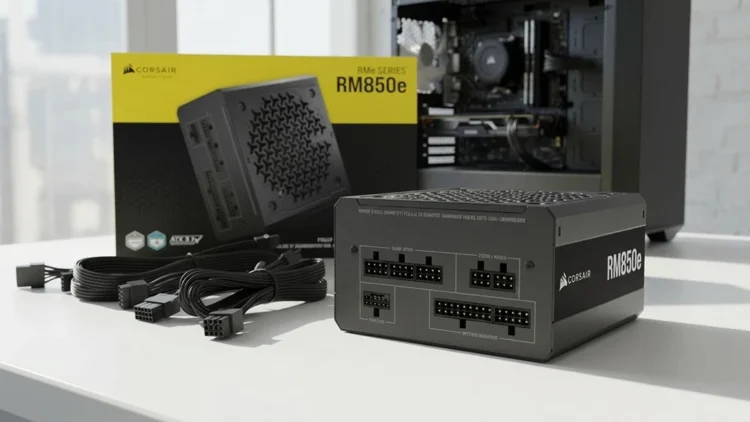
The Corsair RM850e (2025) hits the sweet spot for builders who want room to grow. It delivers 850 watts with ATX 3.1 and PCIe 5.1 compliance, including a native 12V-2×6 cable for modern graphics cards. It is fully modular, so you connect only the cables your build needs, and its Cybenetics Gold certification reflects efficiency of up to 90 percent. At 850 watts, it covers mid-range and upper-tier gaming PCs and meets the minimum my AI box guide recommends for a basic local AI build.
Its compact 140mm-long casing fits nearly any modern ATX case, which matters more than people expect when cable clearance gets tight. The modular design also keeps unused cables out of the way, improving airflow around the motherboard and graphics card.
Quiet Operation and Build Quality
Noise is often the deciding factor for a system that sits on a desk all day. The RM850e uses a 120mm rifle bearing fan with a carefully tuned fan curve, and its Zero RPM mode lets the fan stop entirely during light loads such as web browsing or document work. It carries a Cybenetics A noise rating, which reflects low noise across a wide range of loads.
Inside, Corsair uses 105°C-rated capacitors, a marker of components built to handle heat over the long term. Capacitors are one of the first parts to wear out in a power supply, so this detail matters more than the wattage printed on the label.
It also supports Modern Standby, which allows faster wake-from-sleep times on systems that use it. That is a small convenience, but it fits the unit’s broader focus on practical features over flashy ones.
Quality Over Wattage
The best power supply is not the one with the biggest number on the box. It is the one sized to your build with enough headroom to stay comfortable, certified for efficiency, and compliant with the standards modern graphics cards depend on. That combination protects every other component in your system.
Power delivery also continues past the supply itself. The motherboard regulates that power before it reaches your processor, so a solid board matters as much as a solid supply. My motherboard buying guide covers which board features actually affect stability and which ones are mostly marketing.
Spend on build quality, efficiency, and modern standards first. Add PSU wattage only where your parts truly require it. That approach keeps money in your pocket without putting your system at risk.
Buy the Power Your Build Actually Uses
Most gaming PCs run comfortably on a quality 750W unit, while local AI machines and builds with power-hungry graphics cards need 850 watts or more. The right PSU wattage comes from adding up your parts, leaving sensible headroom, and choosing a unit built well enough to deliver.
The Corsair RM850e covers both worlds, with enough capacity for demanding builds, modern ATX 3.1 protection, and quiet, efficient operation. Size your supply to your build, and the savings, along with the stability, follow.
Power Supply Unit
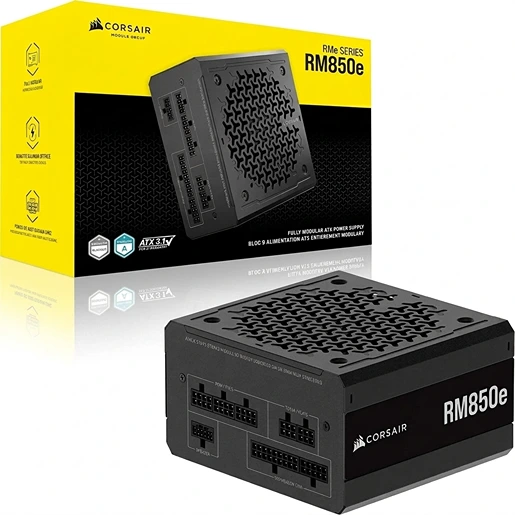
Corsair RM850e
850W ATX 3.1 Power Supply