Shopping for a new board feels like walking into a car dealership where every salesperson swears you need the top trim. Premium motherboards arrive wrapped in heavy armor, glowing screens, and power ratings that sound like they belong on a spacecraft. I have watched builders burn through their entire budget on these boards and gain nothing measurable in return. Choosing a motherboard the smart way starts with separating real engineering from expensive theater.
The truth is that most of the features driving those six-hundred-dollar price tags serve a tiny group of extreme overclockers. Everyone else, whether gaming, editing video, or running AI models at home, needs a short list of specs done well. This guide walks through the features you are paying for but never using, the ones that genuinely earn their cost, and the board that gets the balance right.
Why Power Phase Counts Are Mostly Marketing
The headline pitch on a premium board is almost always power delivery. Brands advertise twenty or more power phases with towering amperage ratings and insist you need that headroom for stability. Those numbers look impressive on a box, but they describe capacity built for liquid nitrogen benchmarking sessions. Unless you plan to push a processor far beyond its factory limits, that extra hardware sits idle for the entire life of your machine.
Modern processors already run close to their thermal ceiling straight out of the box. Chipmakers tune their boost behavior so aggressively that there is very little performance left on the table for the average user. A well-built mid-range board with quality power stages feeds even a high-end chip without breaking a sweat. Adding more phases beyond that point does not unlock hidden speed. It simply adds cost.
Think of it like buying a semi-truck to haul your groceries home. The engine is impressive, the specifications are real, and none of it matters for the job you actually need done. When choosing a motherboard, what matters is whether the power delivery matches the processor you plan to install. Match those two things honestly, and you avoid paying a marketing premium that never shows up in your frame rates or render times.
Paying for Metal Shrouds and Glowing Screens
Look closely at any flagship board and you will find thick aluminum armor covering nearly every inch of the surface. Manufacturers market these shrouds as thermal solutions, yet much of that metal exists to look good behind a tempered glass panel. The components that actually need cooling, such as the power stages and M.2 drives, get dedicated heatsinks on mid-range boards too.
Then come the extras that exist purely for show. Tiny diagnostic screens, animated logos, and elaborate lighting zones all add to the sticker price without touching a single data transfer. Brands know buyers associate heavy, flashy hardware with quality, and they price accordingly. That works out well for their profit margins. It works out far less well for anyone trying to build a capable machine on a sensible budget.
If your case sits under a desk where nobody sees inside it, every dollar spent on aesthetics is a dollar taken away from parts that matter. That money buys a stronger graphics card, a faster storage drive, or more memory. Each of those upgrades changes how your computer performs every single day. A glowing logo on your motherboard heatsink never will. Choosing a motherboard with fewer frills frees up that cash.
What Matters When Choosing a Motherboard
Strip away the marketing and choosing a motherboard comes down to a handful of practical questions. Does it support the processor you want, both now and with a future upgrade? Does it offer enough fast slots for your graphics card and storage? Will its networking keep up with your internet connection and home network? Answer those honestly and the decision gets much simpler.
For AMD builders choosing a motherboard, the AM5 platform answers the first question well. Boards built on the B850 chipset support Ryzen 7000, 8000, and 9000 series processors, which leaves room for a drop-in upgrade later. Many B850 boards, including the one recommended here, also bring PCIe 5.0 support to the main graphics slot and fast storage, features that once required a far more expensive board.
PCIe 5.0 and Your Graphics Card
The top expansion slot is where your graphics card lives, and it is the one slot worth scrutinizing. A PCIe 5.0 x16 slot wired directly to the processor gives today’s cards all the bandwidth they can use, with headroom for future generations. Current graphics cards rarely saturate even PCIe 4.0, so this is about longevity rather than an immediate speed boost. Paying for anything beyond a correctly wired slot buys nothing extra.
That longevity matters when you are spending serious money on a graphics card. If you pair your board with a card like the Radeon RX 9070 XT, the card does the heavy lifting while the board’s job is to stay out of the way. A properly wired PCIe 5.0 slot does exactly that, and you will find one on boards that cost far less than the flagships.
M.2 Storage Headroom
Storage is the area where mid-range boards have quietly caught up with their expensive siblings. Fast M.2 drives plug directly into the board, and the number and speed of those slots determine how your storage can grow over time. Gen5 slots offer the highest ceiling, while Gen4 slots still deliver more speed than most everyday workloads demand. Even modest builds benefit from that flexibility once game libraries and project files start piling up.
A proven Gen4 drive such as the Samsung 990 Pro remains an excellent primary drive for games, projects, and large AI model files. Having multiple slots means you can add a second or third drive later without touching the first. That flexibility is worth far more than any decorative heatsink, because it protects your build from running out of space.
Pay attention to how each slot is wired, too. Some secondary slots run at reduced speeds or share bandwidth with other ports, which a spec sheet will reveal if you look closely. Checking those details while choosing a motherboard takes five minutes and prevents the frustration of installing a fast drive in a slot that cannot keep up with it.
Expansion Room for Local AI Builds
If you are building a machine to run AI models at home, the motherboard plays a supporting role that is easy to overlook. My guide to building a private local AI box covers the full parts list, but the board determines how far that system can grow. Expansion capability is what separates a machine you upgrade from one you eventually replace.
Memory capacity is the first consideration. Local AI work benefits from generous system memory, and a board with four DDR5 slots supporting up to 256GB gives you plenty of room to start modestly and expand later. Fast memory support matters as well, since slow memory can bottleneck the data flowing between your processor, storage, and graphics card.
The second consideration is room for another graphics card. A second full-length PCIe slot gives you a path to add more video memory later, though secondary slots on mid-range boards typically run with fewer lanes than the main slot. That trade-off is acceptable for many home AI setups, but it is worth understanding before you plan a dual-card build around any board.
Connectivity Worth Paying For
While I refuse to pay for decoration, connectivity is one premium I gladly accept. Your motherboard is the foundation of your network connection, and outdated networking hardware can quietly bottleneck an otherwise fast machine. Onboard Wi-Fi 7 and 5G LAN are genuine technical upgrades that improve file transfers, online gaming, and remote work day to day. They are features you will use constantly rather than admire occasionally.
Many budget boards still ship with older Wi-Fi standards and slower wired ports. If you move large files across your home network or work from home, the jump to faster networking is noticeable. Paying a little more for a board that includes these features often costs less than buying a separate network card later, and it keeps your desk free of extra adapters.
Why the Tomahawk MAX WiFi II Earns the Pick
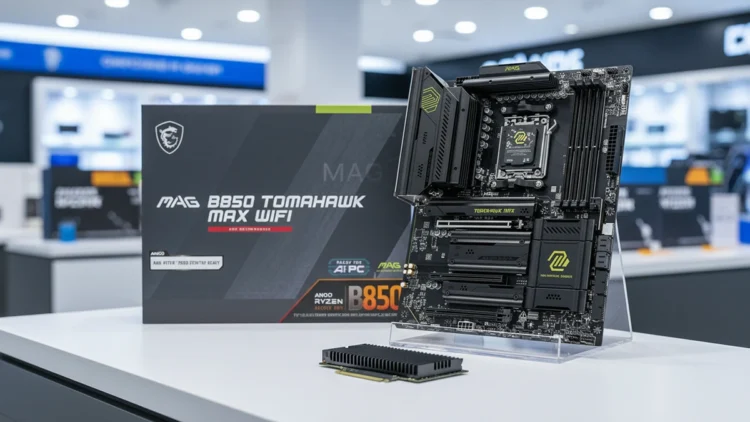
The MSI MAG B850 Tomahawk MAX WiFi II checks every box on that practical list without the flagship markup. According to MSI’s official specifications, it uses a 14+2+1 power design with 80A smart power stages, dual 8-pin CPU power connectors, and an 8-layer board. MSI positions that design for high-end processors, and it comfortably handles the Ryzen 9000 lineup.
The rest of the spec sheet follows the same practical logic. You get a PCIe 5.0 x16 graphics slot, two Gen5 M.2 slots, Wi-Fi 7, Bluetooth 5.4, 5G LAN, and DDR5 support rated up to 8400 MT/s when overclocked. Rear connectivity includes fast USB-C ports and high-definition audio, covering everything a typical home office or gaming desk needs. The styling is understated, with an almost all-black finish that skips the bright accents of the original model.
What Reviewers Found
Independent reviewers largely agree that the II refines rather than reinvents the original. The FPS Review found it stable in benchmarking and well built overall. It highlighted two main improvements over the original: a larger 64MB BIOS chip and MSI’s OC Engine for independent clock tuning.
Not every reviewer saw the update as significant. A PC Perspective writeup described the changes as mostly cosmetic and pointed out that MSI removed nothing from the original design. Both views lead to the same conclusion for buyers: the II is at least as capable as the board that earned strong reviews when it launched in early 2025.
That consistency is what makes this board easy to recommend. Its core strengths, stable power, modern connectivity, and generous storage, have held up across multiple reviews and two versions. You are not gambling on an unproven design. You are buying a refined version of a board that already proved it could deliver premium features at a mid-range price.
When the Original MAX WiFi Is the Smarter Buy
The original MAG B850 Tomahawk MAX WiFi is still worth considering, especially if budget is your top priority. It shares the same 80A power stages, Wi-Fi 7, 5G LAN, and two Gen5 M.2 slots. Depending on the retailer, it often sells for fifty to sixty dollars less than the II, which is a meaningful saving on a mid-range build.
If you have no interest in independent clock tuning and already own a supported processor, the newer features may not matter to you. In that case, the original delivers nearly everything the II offers. Put the difference toward faster memory or a larger storage drive, upgrades you will actually notice in daily use.
The II makes more sense if you are buying a brand-new processor such as the Ryzen 7 9850X3D, want the cleaner all-black look, or value the larger BIOS chip for future updates. Either way, you are choosing a motherboard on substance rather than marketing. Both boards avoid the flagship markup, and both deliver the features that genuinely affect performance.
Pay Only for the Features You’ll Use
Premium motherboards sell a story about power, cooling, and prestige, but most of that story never reaches your screen. The features that matter fit on a short list: a modern socket, a PCIe 5.0 graphics slot, fast storage slots, solid networking, and power delivery that matches your processor. Everything beyond that is decoration you pay for and never use.
Choosing a motherboard does not have to drain your budget. The MSI MAG B850 Tomahawk MAX WiFi II delivers every feature on that list at a fraction of flagship pricing, leaving more money for the components that actually move your performance forward. Spend where it counts, skip the armor and the light show, and build a machine that serves you rather than the marketing department.
MSI MAG

MSI Mag
B850 Tomahawk MAX WiFi ll