Searching for work has never required handing out more personal information than it does today. Applications, background checks, and recruiter messages all ask for details that scammers love to collect. As jobs replaced by AI push more people into online job hunting, criminals have followed the crowd with fake postings and convincing login pages. A single stolen sign-in can turn a hopeful search into a long and exhausting recovery.
Passwords were never built for this kind of pressure, and the codes texted to your phone are not much stronger. A passkey stored on a physical security key changes the math entirely. It ties every sign-in to the real website and to a device sitting in your hand. Attackers who trick you into visiting a fake page walk away with nothing they can actually use.
How Stolen Codes Unlock Your Accounts
Most account takeovers today start with a message that looks completely routine. It might be a job offer, a delivery notice, or a warning that your account has been locked. The link leads to a page that copies the real login screen down to the logo and colors. You type your password, then the six-digit code from your phone, and the page passes both to the attacker within seconds.
That speed is what defeats text and app codes. The attacker logs in to the real site while your code is still valid, then changes the password before you notice anything wrong. According to FTC fraud data, reported losses from job scams jumped from about $90 million in 2020 to more than $501 million in 2024. Fake job offers have become one of the easiest ways to put these pages in front of people.
The problem is not that people are careless. Fake pages now use real security certificates, familiar layouts, and urgent language designed to rush a decision. Even trained professionals fall for them when they are tired or distracted. Any protection that depends on spotting the fake will eventually fail, which is why the fix has to work even when you are fooled.
One Account Leads to Many
Losing one account rarely stays a small problem. Your email inbox is the master key to nearly everything else, because password resets for banks, shopping sites, and social media all flow through it. An attacker who controls your email can request those resets one after another. Within an afternoon, accounts you have not thought about in years can quietly change hands.
Recovery is slow because every company handles it differently. Some ask for photo identification, some ask security questions, and some simply leave you waiting on hold for hours. Meanwhile, the attacker may be messaging your contacts, opening credit lines, or posting under your name. Employers and landlords who search for you can see that damage before you have a chance to explain it.
This is why protecting your email account comes first. Lock that door with something attackers cannot copy, and the chain reaction never gets started. Hardware-backed sign-in is one of the few defenses that holds up even after your password leaks in a breach. It turns your most important account into one that requires a physical tap to approve any new sign-in.
How a Passkey Security Key Works
A passkey replaces the password with a pair of cryptographic keys. When you register a security key with a website, the site keeps a public key while the private key stays locked inside the device. Each time you sign in, the site sends a unique challenge, and the key signs it after a tap or a PIN. The private key never leaves the hardware, so there is nothing for malware to copy.
Passkeys can also live on your phone or computer and sync through your cloud account. That option is convenient, but the FIDO Alliance describes passkeys stored on a hardware security key as device-bound, meaning they never leave that single device. For your email, bank, and password manager, keeping the key in a physical object you control offers the strongest assurance available to everyday users.
Fake Login Pages Hit a Dead End
The real breakthrough is that every passkey is bound to the exact website where you created it. When a fake page asks your key to sign in, the key checks the web address behind the request. A lookalike domain gets no valid response, even if the page looks perfect and you fully believe it is real. The attack fails without you needing to notice anything at all.
This removes human judgment from the most dangerous moment of a scam. Text codes and authenticator apps rely on you to spot the fake before typing anything. A passkey makes that check automatically on every sign-in, at any hour, under any amount of stress. That is the core reason security teams now push phishing-resistant sign-in over the one-time codes most people still use.
Limits Every Owner Should Know
A security key is a major upgrade, but it is not magic. If malware is already running on your computer, it can steal the session that keeps you logged in after a successful sign-in. In that case, the attacker never needs your key at all. Keeping your system updated and avoiding unknown downloads still matters, because the key protects the login rather than the whole machine.
Losing your only key is the other real risk. Without a backup, getting back into your accounts can mean a slow recovery process that defeats the purpose of buying the key. This is why owning two keys matters more than any single feature. One stays with you, while the spare sits somewhere safe at home, ready if the first one goes missing.
The last weak spot is the backup method you leave turned on. If an account still allows sign-in by text message code, an attacker can simply choose that option instead. After both keys are registered, remove SMS and other weaker methods wherever the service allows it. Your protection is only as strong as the weakest sign-in option still attached to the account.
The YubiKey 5C NFC Up Close
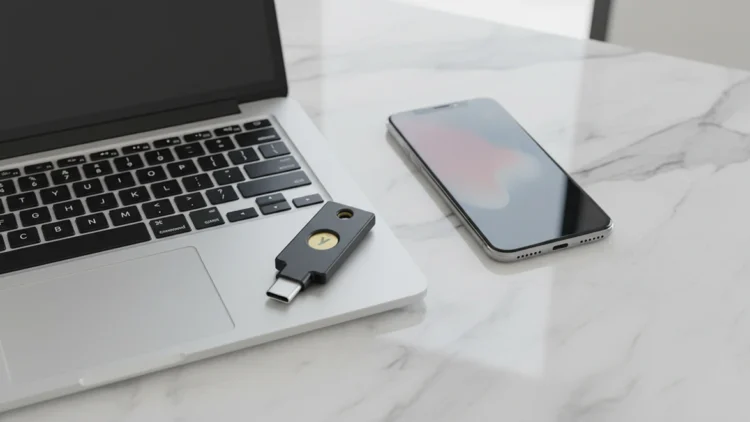
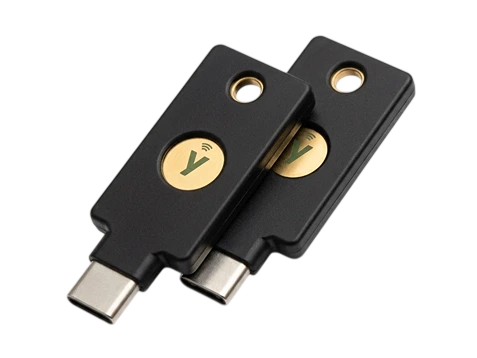
The YubiKey 5C NFC is one of the most popular security keys available, with thousands of buyers on Amazon every month. It plugs into the USB-C ports found on modern laptops, tablets, and Android phones. It also works by tapping it against an NFC-enabled iPhone or Android phone. That flexibility means one key can handle your computer and your phone without any adapters.
According to Yubico’s technical manual, the key supports FIDO2 and WebAuthn passkeys, FIDO U2F, Yubico OTP, OATH codes, smart card (PIV), and OpenPGP. In practice, that covers modern passkey sign-ins along with the older two-factor systems many services still use. The current version holds up to 100 passkeys, which is more than most people will ever need to register.
The build is designed to live on a keychain for years. It has no battery, no screen, and no moving parts, and Yubico rates it as water resistant and crush resistant. Each key costs about $58, and Yubico sells a two-pack on Amazon for roughly double that price. Since you need a primary and a spare anyway, the two-pack is the simplest way to get started.
Security Hardware
YubiKey 5C NFC (2-Pack)
FIDO2 Passkey Security Key for USB-C and NFC
Stores passkeys on hardware you carry, so fake login pages get nothing they can use. Works with USB-C laptops and NFC phones, and the two-pack gives you a primary key and a spare.
As an affiliate, we may earn a commission from qualifying purchases
.
Setting Up a Primary and a Spare
Register both keys on every account during the same sitting. Most major services, including Google, Microsoft, and Apple, let you add more than one security key in the account’s security settings. Name each key clearly so you know which one is which later. If you add only the primary now, you may forget the spare until the day you actually need it.
Keep the primary on your keychain and the spare in a secure place at home, such as a locked drawer or a safe. Set a PIN on each key for an added layer, so a lost key is useless to whoever finds it. Then test both keys by signing in once with each one. That small check confirms your backup works before an emergency forces you to find out.
Where to Use It First
Start with the accounts that unlock everything else. Your primary email comes first, followed by your password manager, your bank, and any account tied to your job search. Security keys belong within broader data protection habits that also cover backups, encryption, and what you share online. Each account you add removes one more easy target from an attacker’s list.
Your home network deserves the same attention as your logins. Comparing threat protection versus antivirus shows how blocking malicious sites at the router adds another barrier before a fake page ever loads. Physical risks matter too, and physical tracking threats like hidden tags show that protecting yourself now extends beyond the screen. Together, these layers cover far more ground than any single tool can.
A Small Key With a Big Job
Scammers will keep improving their fake pages, especially as more people search for work and share their details online. What they cannot fake is the physical key in your pocket. A passkey on hardware you own turns the most common attack into a dead end. You stop relying on your ability to spot every trick, because the key does that work for you.
The cost is small compared with the time and stress of rebuilding a stolen identity. Two keys, a few minutes of setup, and the removal of weaker sign-in options are all it takes. Few security upgrades deliver this much protection for so little ongoing effort. There are no subscriptions to renew and no apps to keep updated.
Owning your tools has become one of the best ways to stay steady while the job market keeps shifting. A security key is a simple place to begin, because it protects the email, bank, and work accounts that everything else depends on. Set it up this week, register the spare, and close the door that attackers walk through most often.