Walk down any memory aisle, physical or online, and the same handful of famous names dominate the shelf. Their boxes are louder, their marketing budgets are bigger, and their prices usually reflect it. Most builders grab one of those logos and move on, assuming the extra money buys extra speed. A closer look at DDR5 6000 RAM tells a different story, because the numbers that decide performance are printed right on the spec sheet, and they do not care whose name is on the heat spreader.
This guide breaks down what those numbers mean, why 6000 MT/s is the smart target for AMD builds, and why the Patriot Viper Venom delivers the specs that matter without charging extra for a famous logo. It also covers where premium kits still earn their price, because a fair comparison has to cut both ways.
The Hidden Cost of a Famous Logo
Here is something the big brands rarely advertise: most memory companies do not make their own memory chips. The majority of DDR5 chips come from a small group of manufacturers, led by Samsung, SK hynix, and Micron. Brands buy those chips, mount them on circuit boards, test them, add a heat spreader, and sell the finished kit under their own name.
That means two kits from very different brands can share chips from the same factory. What separates them is binning, which is how carefully the chips are sorted and tested, along with the circuit board, the heat spreader, the warranty, and the marketing. Some of those differences matter. Many do not, especially once two kits are rated for the same speed and timings. When a famous kit costs noticeably more for identical ratings, a good part of that difference is paying for the name and the advertising behind it.
None of this makes big brands bad. Their kits are often excellent. It simply means the logo is not a performance spec, and treating it like one is the fastest way to overpay for memory that runs no faster than a lesser-known alternative.
Speed and Timings in Plain Terms
Two numbers do most of the work on any memory listing. The first is the speed, measured in megatransfers per second, or MT/s. A DDR5 6000 RAM kit moves data at 6000 MT/s, and higher numbers mean more data can flow between the memory and the processor each second. Think of it as the width of a highway.
The second number is the CAS latency, shown as CL. It measures how many clock cycles the memory needs to respond to a request, so lower is better. A CL30 kit answers faster than a CL36 or CL40 kit running at the same speed. If speed is the width of the highway, latency is how long you wait at the on-ramp before merging. You will often see a longer string of numbers, like 30-40-40-76, which lists secondary timings, but the first number carries the most weight for everyday shoppers.
The sweet spot is a kit that balances both: high enough speed to keep data flowing and low enough latency to keep responses quick. That combination, not the logo, is what you are actually paying for.
DDR5 6000 RAM Hits the AMD Sweet Spot
On AMD’s Ryzen platforms, faster memory is not automatically better. Ryzen processors link the memory to an internal connection called the Infinity Fabric, and performance is best when the memory and that fabric run in step with each other, often described as a 1:1 ratio. For Ryzen 7000 processors, that sweet spot landed at 6000 MT/s. According to TechPowerUp’s reporting, Ryzen 9000 processors can hold that 1:1 ratio up to 6400 MT/s, though AMD still targets 6000 as the sweet spot and the gains from going higher shrink quickly.
That makes DDR5 6000 RAM the safe, proven choice for nearly any AM5 build. It runs reliably in that efficient mode, it works across both Ryzen generations, and it avoids paying extra for speed the platform cannot fully use. The video below compares 6000 and 6400 directly on a Ryzen 9000 system.
6000 Versus 6400 in Real Use
The gap between the two speeds is smaller than the marketing suggests. In most games and everyday tasks, a well-timed 6000 kit lands very close to a 6400 kit, and tight timings can close much of the remaining distance. Faster kits can also be pickier about which motherboards and processors run them stably at their rated speed, which adds a layer of risk for little reward.
For most builders, the smarter move is to put the price difference toward something that changes performance more, such as a better graphics card or a larger storage drive. 6400 kits make the most sense for enthusiasts chasing every last frame on a Ryzen 9000 chip.
A Closer Look at the Patriot Viper Venom
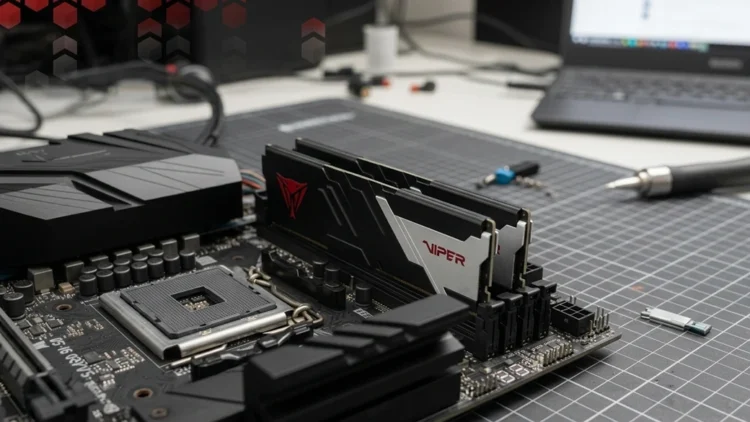
The Patriot Viper Venom checks every box above. This kit, model PVV532G600C30K, pairs two 16GB modules for 32GB total, running at 6000 MT/s with CL30 timings rated at 30-40-40-76. It runs at 1.35 volts and supports both AMD EXPO and Intel XMP 3.0 profiles, so it works cleanly on AMD builds while staying flexible if you ever switch platforms. Patriot backs it with a limited lifetime warranty.
The design is understated, with a matte black aluminum heat spreader, a red Viper logo, and a silver nameplate. There is no RGB lighting on this version, which keeps the price down and suits builders who care more about performance than light shows. At about 43mm tall, it clears most air coolers, though very large coolers are always worth measuring first.
Each module also includes its own power management chip, a standard DDR5 feature that regulates voltage right on the stick for steadier operation. That is not unique to Patriot, but it is a reminder that the core technology inside budget-friendly kits is the same technology inside the expensive ones.
One-Click Setup With EXPO and XMP
Memory does not run at its rated speed straight out of the box. Without a profile enabled, most systems default to a slower standard speed. AMD EXPO fixes that with a stored profile that applies the kit’s rated speed, timings, and voltage in a single BIOS setting. Intel XMP does the same job on Intel systems.
Enabling it takes a minute. Enter your motherboard’s BIOS during startup, find the memory or overclocking section, and switch the EXPO profile on. The first boot afterward may take longer than usual while the board trains the memory to the new settings, which is normal. Once it finishes, later boots return to their usual speed.
Two cautions are worth knowing. AMD classifies EXPO as overclocking and notes that running memory beyond official specifications can void the AMD processor warranty, even when enabled through AMD’s own tools. In practice, EXPO is widely used, but the risk is worth understanding. Your board matters too, so picking a motherboard with solid memory support and current BIOS updates makes EXPO far more reliable.
How Much Memory You Actually Need
For gaming, everyday work, and most creative tasks, 32GB of DDR5 6000 RAM is the comfortable standard for a new build. It leaves plenty of room for games, browsers, and background apps without slowing down, and it is where most buyers should start.
Heavier workloads change the math. Video editing, large photo projects, and local AI work can benefit from 64GB. Patriot sells 64GB Viper Venom kits as well, including DDR5-6000 and DDR5-6400 versions, so you can step up without switching brands. Just keep in mind that larger kits can be harder for some boards to run at top speed, so check your motherboard’s memory support list first.
Fast Memory for Local AI Builds
Memory matters more than most people expect for running AI at home. When a model is too large to fit inside your graphics card’s memory, the overflow spills into system memory, and that is where speed and capacity start to count. Faster RAM shortens that delay, and more of it lets you load bigger models without everything grinding to a halt. My local AI box guide covers how memory fits alongside the graphics card and storage in a balanced build.
If you are still deciding whether to bring AI work home at all, my guide on how to run AI locally explains what the setup involves. For most local AI builds, 32GB of fast DDR5 is a workable starting point, with 64GB the better target for larger models.
What Testing and Buyers Show
The DDR5 6000 CL30 combination has become one of the most popular memory configurations for AMD builds, and for good reason. It delivers the efficient 1:1 performance Ryzen processors favor, with timings tight enough to keep responses quick.
The Viper Venom has built a strong buyer track record as well. On Amazon, it carries hundreds of reviews with an average rating above four stars, and hundreds of buyers pick it up each month. That steady demand suggests the kit performs as advertised for most people and that stock is reliable, which matters when you are planning a build.
A few buyers mention slow first boots while their motherboards trained the memory, which matches the normal behavior described earlier. That is a one-time wait, not a defect, and it is common across DDR5 kits from every brand.
Where Premium Kits Still Make Sense
To be fair, premium kits are not always a waste. Some offer even tighter timings, such as CL28 at 6000 MT/s, which can squeeze out a little more performance for competitive players. Others are binned for higher speeds, giving overclockers more headroom to push beyond their rated profiles.
Looks matter to some builders too. If your case has a glass side panel and you want synchronized RGB lighting, a premium kit with polished styling may be worth the extra money to you. That is a personal choice, not a performance one.
For everyone else, the extra cost rarely shows up where it counts. A well-rated CL30 kit at 6000 MT/s delivers nearly all the real-world performance most builds will ever use, and the savings can go toward parts that make a bigger difference.
Read the Numbers, Not the Logo
Memory shopping gets simpler once you ignore the logos and read the numbers. On AMD builds, DDR5 6000 RAM with CL30 timings hits the platform’s sweet spot, runs reliably with a single EXPO setting, and avoids paying for speed the processor cannot fully use.
The Patriot Viper Venom delivers exactly that combination, backed by a lifetime warranty and a strong buyer track record, without the premium that comes with a famous name. Spend where it counts, enable EXPO, and put the savings toward the parts that move your performance forward.
Memory Kits
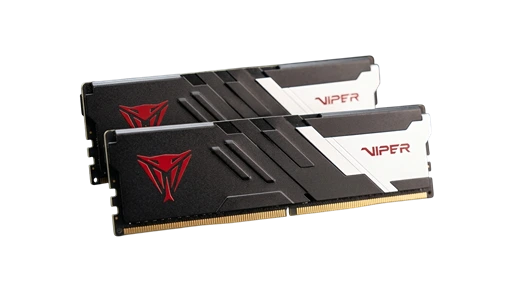
Patriot Viper Venom
DDR5 6000 CL30 2x16GB Kit