Home Assistant local control transforms corporate ecosystems that resemble a gilded cage designed to harvest personal data while demanding recurring subscription fees. For years, major retailers pushed glossy, $250 touchscreens that functioned as digital billboards for proprietary services. Hardware that should remain functional for a decade often becomes a plastic brick the moment an internet connection fails or a remote server is decommissioned. Building a private smart home hub required bypassing the traditional consumer market to find a more reliable solution.
Ultimately, technical sovereignty served as the primary motivation for this project rather than simple cost savings. Pairing a specialized local processor with the dormant chips already sitting in a junk drawer provided a performance level that outperformed retail displays. Transitioning from consumer-grade to enthusiast-grade hardware allowed for the reclamation of data privacy and total system reliability. This shift ensured the DIY home control system remained responsive regardless of external cloud outages or corporate policy changes.
Proprietary Software Slowdowns Hide Local Smart Home Value
At first glance, home automation feels like a luxury. Five-figure custom installations requiring professional wiring dominate the conversation. Additionally, luxury tech forums frequently showcase high-end panels with expensive annual maintenance contracts. Most users sideline legacy tablets because they struggle with modern mobile games. Yet their screens remain masterpieces of engineering capable of vibrant color reproduction.
Shifting perspective requires stripping away corporate bloatware. Bloatware slows down older operating systems significantly. Treating a tablet as a high-quality window ignores the laggy background processes of a standard mobile OS. Furthermore, a single Home Assistant local control application transforms the device into a high-speed interface. I found that repurposing old hardware delivers high-end utility without the retail markup or environmental waste.
More importantly, reliability increases significantly when a private home hub setup functions during a total ISP outage. Consequently, removing the tablet from the public internet eliminates lag from cloud-based voice assistants. The chip inside the tablet no longer spends 80% of its processing power on background analytics or telemetry data. Instead, every available resource renders a high-definition dashboard for environmental control. This transition turns a stuttering device into a fluid, professional-grade interface.
Home Assistant Local Control Starts With a Dedicated Private Brain
Local-first automation requires a dedicated hub. Specifically, it acts as the primary intelligence engine for the entire property. While previous setups relied on distant cloud servers, a Home Assistant local control hub lives directly on the network. The Home Assistant Green features an Amlogic S905X3 chip and 4GB of RAM. As a result, it manages thousands of devices and complex automation rules with ease. Furthermore, processing happens inside the home, meaning screen tap response is virtually non-existent.
For those new to local automation, the official Home Assistant platform provides detailed documentation and community support to help any skill level get a private system running quickly.
Avoiding the “Subscription Tax” is a major benefit of moving away from brands like Amazon or Google. Purchasing the hardware once ensures the logic remains under the user’s control forever, regardless of changes to corporate terms of service. The hub automatically scans the network for media players, smart bulbs, and sensors to unify them into a single private database. Some users might prefer a different hardware path for their local control depending on their comfort with radio-frequency devices. You might compare Hubitat C-8 Pro capabilities to see which local philosophy fits a specific technical comfort level or project scope.
Coordination of various device “languages” is the primary task of this central hub. Whether a device utilizes Zigbee, Z-Wave, or Bluetooth, the hub translates the signal into a cohesive dashboard for the tablet display. This architecture acts as a secure firewall to prevent smart bulbs from communicating with overseas servers or leaking private habits to third-party advertisers. Centralizing the intelligence removes the need for twenty different mobile apps to check the status of locks or cameras. Everything runs on hardware owned and controlled entirely within the safety of a DIY home control system.
Professional Power Solutions Maintain Your Private Home Hub
The most critical part of this project wasn’t the software. Instead, it was the power delivery setup that kept the mobile interface functional and safe. A Home Assistant local control setup needs an efficient charging base. Moreover, higher wattage handles multiple devices without the charger becoming a heat-related failure point. A 140W GaN block powers a high-resolution tablet without excessive thermal stress.
GaN technology utilizes conductive materials that are significantly more efficient than traditional components. These chargers are much smaller than older bricks, allowing for a clean refueling station on a side table or nightstand without bulky cable clutter. Even a high-end charger fails if the cable is weak; high-power setups require cables marked for 100W or 240W EPR to prevent the charger from automatically throttling its output for safety. It is wise to research charging blocks to understand how these specifications protect hardware long-term and prevent money from being wasted on a bottlenecked home network.
Preventing hardware failure requires managing battery health over long periods. Keeping a battery at 100% charge causes swelling and permanent chemical breakdown. A smart plug automates charge cycles between 20% and 80% based on real-time feedback. This cycle mimics natural use and extends legacy hardware lifespan. A blueprint video tutorial simplifies these logic gates to ensure the YAML syntax triggers your local hardware correctly.
For setups that extend beyond the home — whether a mobile workstation, a camper van, or an off-grid remote location — power reliability becomes a larger concern. A dedicated portable power station bridges the gap between a stable private home hub and life on the road. If energy independence is part of your build, this EcoFlow DELTA 2 value breakdown covers how LFP chemistry and modular expansion deliver long-term power stability.
Mobile Interface Placement Enhances Daily Smart Home Utility
Portability remains the greatest asset of a repurposed tablet compared to stationary displays bolted to a wall. Mounting a device often restricts its convenience and makes the battery health significantly harder to manage over time. A mobile command center follows the user throughout the day to adapt to changing needs in real-time. It sits on the coffee table for theater lighting, moves to the kitchen for recipes, and rests on the nightstand for security monitoring. A specialized kiosk application locks the hardware into a single dashboard to prevent the device from ever leaving its intended function.
Weighted charging stands allow for easy, one-handed removal whenever the interface needs to move to another room. This gives the tablet a stable home where it stays charged but remains ready for handheld use at any moment. This approach turns e-waste into a versatile home appliance that functions anywhere within Wi-Fi range without being tethered to a specific wall. Flexibility separates a DIY home control system from a locked-down retail product that treats the user as a stationary consumer. A mobile interface proves far more useful than a screen permanently stuck in a hallway where it is rarely accessed.
Technical sovereignty is the ultimate goal in an era of closed digital ecosystems. Users are no longer at the mercy of a corporate cloud service that might vanish or a forced firmware update that bricks legacy devices. Leveraging the security-first design of modern protocols ensures a Home Assistant local control setup remains more secure than off-the-shelf alternatives. Every device attestation is verified locally to keep personal habits and data off the public internet. As you expand a setup to break away from proprietary ecosystems, I recommend you Matter standard to understand how universal protocols ensure a hub stays compatible with future innovation.
Local Control Architecture Secures Future System Compatibility
Intelligent architecture defines sophisticated smart homes. High price tags do not. Refusing planned obsolescence turns a junk drawer into a high-performance private smart home hub. The total cost stays lower than a single premium retail display. The result is more responsive and entirely private.
Freedom from local smart home automation ensures this system evolves as new devices are added. Power-efficient infrastructure stays relevant for the next decade. Escaping big tech starts with looking at old hardware differently. The tools already exist. They simply require a local brain — not another cloud-branded hub that keeps every automation dependent on an outside company. That tension is exactly why the smart home hub control myth reference article unpacks these topics in more detail.
Home Assistant Green
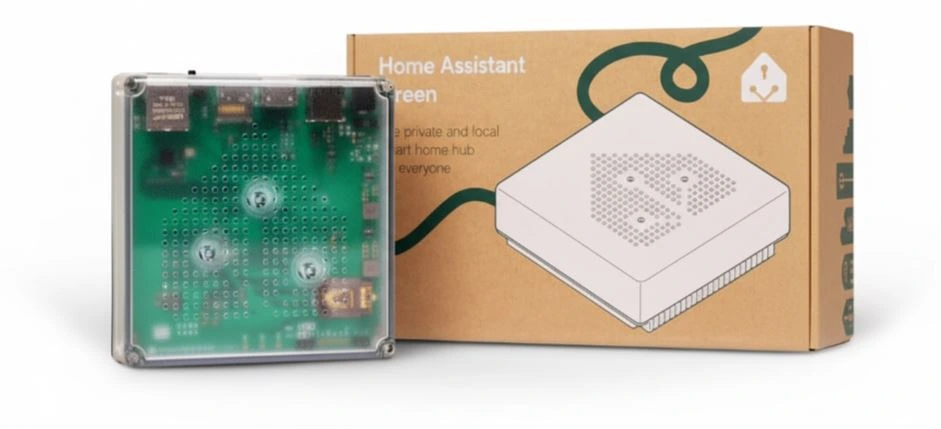
Home Assistant Green
Smart Home Hub