The Realization That My Legacy Hardware Had Untapped Potential
Most people stop seeing the hidden value in a their old hardware when the latest and greatest hardware appears. I was no different and was a victim to the commercialism that mesmerized me with shiny new toys. My old tablet was too slow, didn’t hold a charge, and the software bloat just made it impossible to operate.
I then had an ephifamy and I stopped treating the device as its own computer. I began to see it as a secondary screen for a much more powerful system. By sending simple and static data to this old tablet, I freed up space on my main monitors. That change in thinking, turned a worn out asset into a focused tool that improved my work. It showed that hardware can outlast the software it first shipped with.
Repurposing your old hardware for new utility
The shift from a standalone device to a focused peripheral depends more on connectivity than on a hardware upgrade. Most legacy tablets still handle fast wireless data over a local network, even when their built in system is outdated.
By using light, cross platform apps, you can send a secondary display or custom macro keys from your main workstation. This removes the need for the tablet processor to run heavy local tasks and lets it act as a clear viewing window. This setup often removes the lag and instability seen with generic screen-sharing tools found in app stores.
Setting up this environment usually takes two small installs, a server app on your PC and a client app on the tablet. Once they connect, the tablet appears to your system as an extra monitor or an input device. It turns a discarded device into a reliable high-resolution interface that functions as a native part of your desktop.
Building a high‑resolution diagnostics display from legacy hardware
Monitoring system health should not compete with your main workspace. Dedicating the tablet screen to these metrics creates a permanent, physical telemetry station that runs outside your active windows.
This setup gives you a quick view of CPU temperatures, memory use, and network throughput without a single alt tab. A dedicated dashboard sends hardware data from your PC to the tablet over the local network. Because the tablet only renders a static interface, it puts almost no load on its legacy processor architecture and keeps the readouts smooth.
Most diagnostics tools now support a remote web output or a client dashboard that updates in real time. That means you get a monitoring layout that feels like custom rack gear, built from hardware you already own. It proves that old consumer devices can still deliver top level performance when used as a focused data window.
Converting a tablet touchscreen into a macro command surface
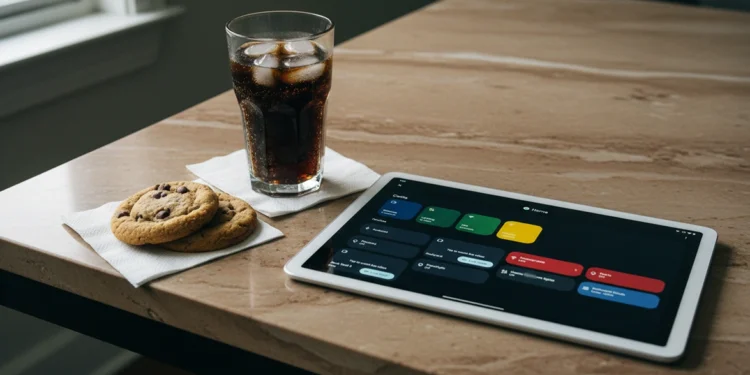
Physical buttons are limited, but a tablet screen can change to match any task. By placing large, clear icons on the display, you build a control panel that fits the way you work instead of forcing you to adapt. This gives you fast access to the tools you hit every day without crowding your main keyboard or mouse area.
Mapping complex shortcuts to simple taps removes a lot of friction from demanding software. Instead of remembering long key combinations, you trigger them with a single touch. That keeps your focus on the work in front of you, not on hunting through menus or trying to recall obscure commands.
Many apps hide key actions deep inside nested menus, which slows you down when deadlines are tight. A dedicated macro surface pulls those actions onto one screen where you can see and reach everything at once. It turns a passive tablet into an active low lag controller that supports your most intensive creative and technical workflows.
Using retired hardware as a standalone network monitoring node
Dedicated network visibility is often the first casualty of a single-monitor setup during intensive tasks. By offloading a real-time traffic analyzer to the tablet, you maintain a persistent “weather map” of your local bandwidth and latency without sacrificing your primary screen real estate. This isolation ensures that a sudden spike in PC resource usage doesn’t lag the monitoring tool or obscure a legitimate connectivity drop that could interrupt a critical upload.
The tablet functions as a standalone node that pings critical external services and internal devices every few seconds to verify uptime. Configuration involves running a lightweight monitoring agent that pushes a visual data-grid to the tablet’s IP address for immediate, glanceable status updates throughout the day. You can customize the alerts to flash specific colors when latency exceeds a set threshold, giving you a non-intrusive heads-up before a video meeting or remote session fails.
Avoiding new costs by repurposing your old hardware
The push to upgrade often comes from a feeling of limited space, not from weak computing power. By putting a legacy tablet back to work, you step out of the upgrade cycle and avoid paying for extra screens or niche gear. This change in mindset lets you get real professional value from devices that might otherwise end up as electronic waste.
Repurposing your old hardware as a cost‑avoidance strategy
Trade war tariffs quietly push up the price of monitors and tablets. In that climate, reusing old hardware becomes a smart financial move. You avoid paying for extra screens and specialized gear that now carry added import costs.
An old tablet can step in as a dedicated diagnostics screen that runs beside your main display. You can also turn it into a macro controller or a basic network monitor that supports your daily work. Each role replaces a device you would otherwise have to buy new. This approach protects your budget while still improving your setup. To see how much of today’s “new gear” pricing is really trade policy passed on to you, read our breakdown of the hidden real cost of tech tariffs on your hardware.
Building a sustainable, multi‑screen workflow from existing tools
True workspace optimization comes from combining tools you already own instead of always buying new hardware. This repurposed workflow gives you a setup that fits your technical needs without the hassle of locked down software or hardware. It turns a discarded device into a key part of your daily toolkit and proves that smart use matters more than new specs.
This approach becomes a blueprint for sustainable tech use in any demanding environment. It encourages you to understand the hardware you already own while still giving you a strong multi screen layout with no extra cost. By caring about what the screen can do, instead of how new the processor is, you turn a forgotten device into a useful part of your daily routine.
Strategic benefits of repurposing your old hardware
Switching from a buying mindset to a reuse mindset can sharply improve how efficiently you work. When you ignore the age of a device and focus on the parts that still perform well, you uncover useful tools that only require a bit of time instead of new money. This approach does more than clear a drawer, it builds a flexible workspace that is less affected by constant upgrade cycles from hardware makers.
Ultimately, the most powerful workstations are the ones built with intention, not just bought off a shelf. A legacy tablet can act as a diagnostics screen, and an old drive can serve as offline storage that still matters. These repurposed assets offer a kind of specialization that generic new hardware rarely matches and keep your setup useful even as the silicon ages.