PC builders love to brag about their specs like they’re preparing for a mission to Mars. Every year, the major hardware brands release “extreme” boards that look like they belong in a futuristic tank. They have massive metal shrouds and glowing screens that compete with your car payment. I’ve watched too many enthusiasts fall for this trap and blow their entire budget on a part that provides zero extra frames per second.
The truth is that most of these expensive features are a technical distraction. Manufacturers want you to pay for things you’ll never actually use. They market extreme voltage modules and liquid nitrogen support to people who just want to play games or edit video. It’s time to find the motherboard hardware limits and stop paying a premium for metal that does nothing.
The Voltage Myth Why High Phase Counts Are Often For Show
The primary sales pitch for a five hundred dollar board is the power delivery system. Brands boast about having twenty or thirty power phases with massive amperage ratings. They tell you that you need this stability to keep your chip running at its peak. In fact, unless you are using exotic cooling like liquid nitrogen, you’re paying for a headroom you’ll never reach.
Most modern chips are already pushed to their thermal limits out of the box. You aren’t going to find a massive hidden speed boost by buying a board with more power phases. A mid-range board with decent cooling handles a high-end chip just fine. Technical data from The FPS Review shows that even power-hungry chips don’t see a performance gain from these overbuilt boards during a standard workday.
Buying into the extreme power hype is like buying a professional race car to drive to the grocery store. It feels impressive on the spec sheet, but it provides no practical benefit in your daily workflow. You are essentially paying a tax for marketing labels that have nothing to do with how your PC actually runs. Understanding these motherboard hardware limits is the first step toward a smarter build.
Paying For Metal Shrouds And Other Technical Distractions
If you look closely at a premium board, you’ll see it’s covered in heavy aluminum armor and lighting. These shrouds are often marketed as thermal solutions designed to keep the board cool. While heat management is important, most of this metal is purely for show. You are paying a huge markup for a design that is only meant to look good in a glass case.
This is a hidden cost that brings no utility. Brands know that gamers will pay more for a board that looks professional. They add tiny screens that display your temperature or animated logos that do nothing for your data speeds. It’s a smart move for their profit margins, but it’s a bad move for your bank account.
You can find the same essential tech on a board that looks a bit more understated. If you aren’t staring at your hardware through a side panel all day, that extra money is wasted. Put those funds into a better graphics card or more storage instead. If you are worried about rising costs, see my look at how new tariffs are affecting technology prices and why your next build might cost more than expected.
Why The MSI MAG B850 TOMAHAWK Wins On Core Specs
So what actually matters when you’re looking at the motherboard hardware limits of today? You want a board that handles the latest hardware without adding unnecessary fluff. Support for PCIe 5.0 is a smart move for future-proofing your storage and graphics. You also want a solid networking stack with Wi-Fi 7 and at least 5G LAN to keep your connection stable.
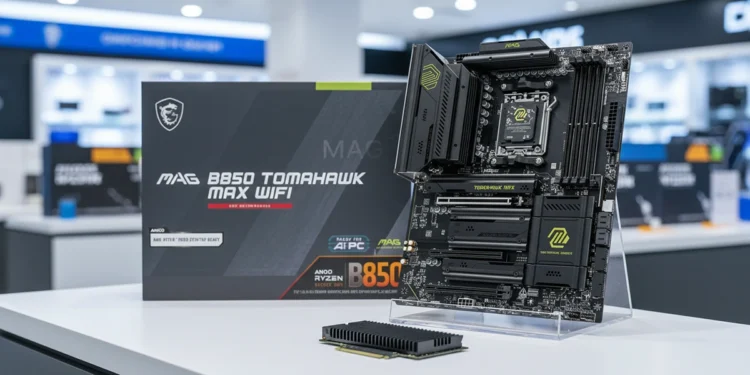
The MSI MAG B850 TOMAHAWK MAX WIFI is a perfect example of hardware that respects your investment. It supports the latest Ryzen 9000 and 7000 processors without the six hundred dollar price tag. It features an 80A SPS power system that is more than enough for even the most demanding chips. You get the power you need without the extreme markup.
This board also includes Quadruple M.2 connectors, including two Gen5 slots. This gives you massive storage expansion for the future. It’s a focused tool that prioritizes the specs that actually matter, like Wi-Fi 7 and high-speed memory support. It’s the kind of machine logic that doesn’t need flashy lights to prove its worth.
Connectivity Is The Only Premium Feature Worth Your Cash
While I hate paying for aesthetics, I do believe in paying for connectivity. The industry is moving toward faster networking, and your board is the foundation of that. Having 5G LAN and Wi-Fi 7 onboard is a genuine technical win. These features actually improve how you interact with the web and your local network.
Most budget boards still ship with outdated ports or older Wi-Fi standards. If you do a lot of file transfers or online gaming, the jump to 5G and Wi-Fi 7 is noticeable. It ensures your machine won’t be the bottleneck in your home office. The TOMAHAWK MAX includes these as standard, making it a savvy long-term choice.
Voltage stability also starts at the wall before it ever reaches your motherboard. Read my look at system power overhead to see why a massive unit is often a technical waste for most builds. I appreciate the inclusion of USB 20G Type-C and high-performance audio on the TOMAHAWK. These provide a better experience when connecting peripherals or using high-end headphones.
Does This Hardware Earn Its Keep
The idea that more expensive always means faster is a myth. You are being asked to pay for extreme overclocking features and heavy metal shrouds that offer zero real-world value. Unless you are a competitive benchmarker, a five hundred dollar board is a bad technical investment. It simply doesn’t earn its keep.
The MSI B850 TOMAHAWK proves that you can get high-tier connectivity and stable power for a fraction of the cost. It respects your money by cutting the party tricks and focusing on the core hardware. It’s a durable, high-speed foundation that will stay relevant for years. You aren’t compromising on performance; you’re just refusing to pay the enthusiast tax.
My final take is simple. Don’t let the marketing hype convince you that a more expensive board will make your PC faster. Buy the board that has the ports you need and the power delivery that can handle your chip. Keep the rest of your cash for the components that actually drive your performance. Finding the motherboard hardware limits is the best way to protect your budget.
Check the current availability of the MSI MAG B850 TOMAHAWK here to see if you can finally stop overpaying for your motherboard.
MSI MAG

MSI Mag SystemBoard
B850 Tomahawk