The Realization That My Legacy Hardware Had Untapped Potential
It started as a simple matter of desk space and a lingering sense of waste. My old tablet had become a literal paperweight, its processor too sluggish for modern web browsing and its battery life a fraction of its former self. I initially viewed it as an obsolete piece of glass, a candidate for the e-waste bin or a forgotten drawer. However, the hardware itself—specifically the high-resolution display and the dedicated touch interface—remained perfectly functional and isolated from the software bloat that had crippled its original OS.
The discovery occurred when I stopped treating the device as a standalone computer and started viewing it as a dedicated, secondary peripheral for a much more powerful system. By offloading specific, static data streams to this “obsolete” hardware, I realized I could reclaim valuable screen real estate on my primary monitors. This shift in perspective turned a depreciated asset into a specialized tool that actually enhanced my professional workflow. It was a clear case of hardware outliving its intended software lifecycle.
A Simple Approach For Extracting New Utility From Your Outdated Tablet Hardware
The shift from a standalone device to a specialized peripheral requires a change in connectivity rather than a hardware overhaul. Most legacy tablets excel at low-latency wireless data transfer over a local network even when their native OS is obsolete.
By utilizing lightweight, cross-platform applications, you can effectively “tunnel” a secondary display or a set of custom macro keys from your primary workstation. This bypasses the need for the tablet’s processor to handle heavy local computing, leaving it to act as a simple, high-fidelity window. This configuration eliminates the lag and instability often associated with generic screen-sharing tools found in app stores.
Setting up this environment typically involves a two-part installation consisting of a server-side application on your PC and a client-side app on the tablet. Once the handshake is established, the tablet appears to your operating system as an additional monitor or a HID-compliant input device. It transforms a discarded piece of consumer electronics into a reliable high-resolution interface that functions as a native part of your desktop.
Creating A High Resolution PC Diagnostic Hub
Monitoring system health should not compete for space with your primary workspace. Dedicating the tablet’s screen to these metrics creates a permanent, physical telemetry station that operates independently of your active windows.
This setup provides an immediate, glanceable readout of CPU temperatures, RAM allocation, and network throughput without requiring a single alt-tab. The execution relies on a specialized dashboard that feeds data from your PC’s hardware sensors directly to the tablet interface over a local network. Because the tablet is only rendering a static UI, it places almost zero strain on its legacy processor architecture, ensuring the readouts remain fluid.
Most modern diagnostic suites allow for a remote web-server output or a dedicated client-side dashboard that updates in real-time. This configuration results in a professional-grade monitoring solution that looks and feels like a bespoke piece of high-end rack gear. It proves that discarded consumer electronics can still provide elite performance when used as a specialized data window.
Transforming The Touch Interface Into A Macro Control Center
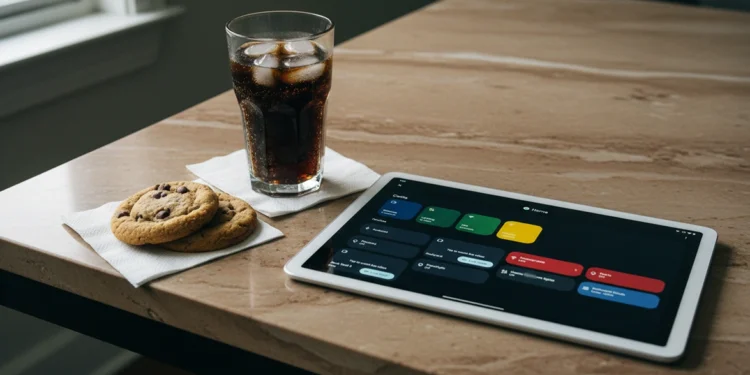
Physical buttons are finite, but a touch interface is infinitely reconfigurable for any professional workflow. Mapping complex keyboard shortcuts and multi-step macros to large, colorful icons on the tablet creates a tactile command station that rivals expensive, dedicated hardware controllers. This setup ensures that your most-used tools are always exactly where your hand expects them to be without cluttering your primary digital workspace.
Standard productivity apps and creative suites often bury essential functions deep within nested menus that disrupt your creative momentum. A dedicated macro surface allows you to trigger these actions with a single tap, effectively offloading cognitive load from your primary screen to a secondary, specialized interface. This transformation turns a passive viewing device into an active low-latency controller for your most demanding software suites.
Deploying An Independent Network Monitoring Node
Dedicated network visibility is often the first casualty of a single-monitor setup during intensive tasks. By offloading a real-time traffic analyzer to the tablet, you maintain a persistent “weather map” of your local bandwidth and latency without sacrificing your primary screen real estate. This isolation ensures that a sudden spike in PC resource usage doesn’t lag the monitoring tool or obscure a legitimate connectivity drop that could interrupt a critical upload.
The tablet functions as a standalone node that pings critical external services and internal devices every few seconds to verify uptime. Configuration involves running a lightweight monitoring agent that pushes a visual data-grid to the tablet’s IP address for immediate, glanceable status updates throughout the day. You can customize the alerts to flash specific colors when latency exceeds a set threshold, giving you a non-intrusive heads-up before a video meeting or remote session fails.
Avoiding The Cost Of New Equipment Through Intentional Repurposing
The impulse to upgrade hardware is often driven by a perceived lack of space rather than a lack of raw computing power. By reclaiming the utility of a legacy tablet, you bypass the cycle of forced obsolescence and the substantial financial investment required for high-end secondary displays or specialized peripherals. This intentional shift in perspective allows you to extract professional-grade value from devices that would otherwise contribute to the growing problem of global electronic waste.
True workspace optimization is found in the clever integration of existing tools rather than the acquisition of new ones. Adopting this repurposed workflow provides a tailored, multi-functional environment that adapts to your specific technical needs without the friction of proprietary software ecosystems or restrictive hardware lockdowns. It transforms a discarded object into a permanent pillar of your productivity suite, proving that strategic deployment is more valuable than cutting-edge specifications alone.
This methodology serves as a blueprint for sustainable technology management in any high-performance setting. It encourages a deeper understanding of the hardware you already own while providing a robust, multi-screen environment at zero additional cost to your operational budget. By focusing on the specific utility of the screen rather than the age of the processor, you turn a forgotten drawer-filler into a vital, functional asset for your daily professional routine.
Strategic Redesign For A Sustainable Technical Workspace
The transition from a consumer mindset to one of strategic hardware recovery marks a fundamental shift in professional efficiency. By looking past the surface-level obsolescence of a device and identifying its core, functional components, you unlock a library of high-performance tools that cost nothing but a small investment of time. This approach doesn’t just clear out a desk drawer; it builds a more resilient, customized workspace that is immune to the arbitrary upgrade cycles imposed by modern manufacturers.
Ultimately, the most powerful workstations are those that are built with intention rather than just purchased off a shelf. Whether it is a legacy tablet acting as a diagnostic hub or an old mechanical drive serving as an offline archive, these repurposed assets provide a level of specialization that generic, new hardware rarely offers. Embracing this sustainable methodology ensures that your technical environment remains at the cutting edge of utility, regardless of the age of the silicon inside your machines.